Your Apple II has come a long way: accelerators, storage by the
gigabyte, RAM disks, and sharp modern video. The one thing none of
it can fix is the modern web, locked behind TLS that no 6502 or
65816 can reasonably run.
CoGS™ is the key. A single slot card that does the impossible parts
on the card: TLS, HTTPS, JSON, true random, and hardware
hashing, handing your Apple II plaintext. The machine stays in
charge of everything else. It is still your Apple. It can just
finally talk to the world.
And the network is a disk library
Drop the card in a slot, power on, and its own config ROM comes
up. You join Wi-Fi, pick a category, browse a catalog of about
2,416 disk titles right on the machine (Total Replay rides along
with 500+ 8-bit titles), and hit Return. Your Apple boots it,
streaming over the internet, block by block, with nothing
installed and no local storage at all.
From power-on to running essentially
any published Apple II app ever written is about one minute:
boot, join Wi-Fi, browse, Return, and it RUNS.
One card, any Apple II: the same board drops into a slot
in the ][+, the //e, or the IIGS. On a IIGS the same
card also streams 200+ songs and internet radio through the
Ensoniq and shows 700+ box covers and title screens.
One card. Nearly every Apple II application ever published, streaming.
No OS, no boot disk, no setup software, no SD card to fill. Seat the card, power on, join Wi-Fi once, and the card's own screens put 2,416 disk titles, hundreds of songs, and hundreds of box covers one Return away, on the machine itself. On a ][+, a //e, or a IIGS.
Disk images
2,416 titles, boot tested
Browse by category (games, music & art, education, utilities), by machine, or A to Z. Hit Return and your Apple boots it over the network, block by block, with nothing installed. Total Replay's 519 arcade titles, the 170 MECC products and 980 programs from the What is the Apple IIGS? collection volumes are in the same list, each by name. Point it at your own share for read/write.
240 tracks on the a2cogs shelves: SoundSmith songs from the demo scene, pop covers, and the holiday shelf play natively through the Ensoniq. PCM tracks, live internet radio, and podcast episodes stream through the card, which transcodes MP3 on the fly. EQ, shuffle, playlists, and background play while you use the desktop.
Press V on any disk and its box art fills the screen: 791 covers in Super Hi-Res, 225 title screens in HGR and double hi-res, all served as the raw bytes the video hardware wants. Browse them by format, mark a few, and run a slideshow.
The hard upgrades are solved. The modern web still isn't slot-native.
Already solved on the Apple II
Acceleration many times faster than stock
Storage solid-state, instant, silent
Memory cheap RAM and huge RAM disks
Display clean output to a modern panel
Sound sound cards well past the beep
Each upgrade follows one quiet rule: more capable, still itself.
The part still missing
The modern secure internet, in a slot.
Every useful API is HTTPS now: certificate chains, key exchange,
X.509 parsing, a handshake state machine — then JSON on top.
That is not a “needs more megahertz” problem; it is
months of fragile cryptography with no business on a 1 MHz to 2.8 MHz CPU.
It has been solved before, and solved well: purpose-built
hardware has terminated TLS on the device for vintage machines
for years, and offloading the hard cryptography is exactly the
right call.
CoGS makes that offload a slot-native co-processor — purpose-built for the Apple II bus, with the speed, low latency, and on-card co-processing only a slot makes possible.
What it does
A network card and a co-processor toolbox.
Every service is a job the host genuinely cannot do, or would be absurd to ask of it. Everything else stays on the Apple II.
Secure web
Your Apple II talks to real HTTPS APIs directly. The card runs the whole TLS handshake and verifies the certificate; the host only ever sees plaintext.
Desk-verified
JSON, without parsing JSON
Ask for choices[0].message.content and the card returns just that value out of a whole API response. A 64 KB machine never touches a parser.
Desk-verified
True random numbers
Real entropy from hardware silicon. No Apple II ever shipped with a hardware RNG. Now yours has one.
Desk-verified
Hardware hashing
Single and double SHA‑256 in dedicated silicon, for the cost of a few register writes. Checked byte-for-byte against the reference.
Desk-verified
A real hardware miner
Hand the card a block header once; it grinds nonces locally at roughly 2400× a stock GS and returns the winner. Your GS keeps running the protocol and the UI.
Desk-verified
Your modern NIC
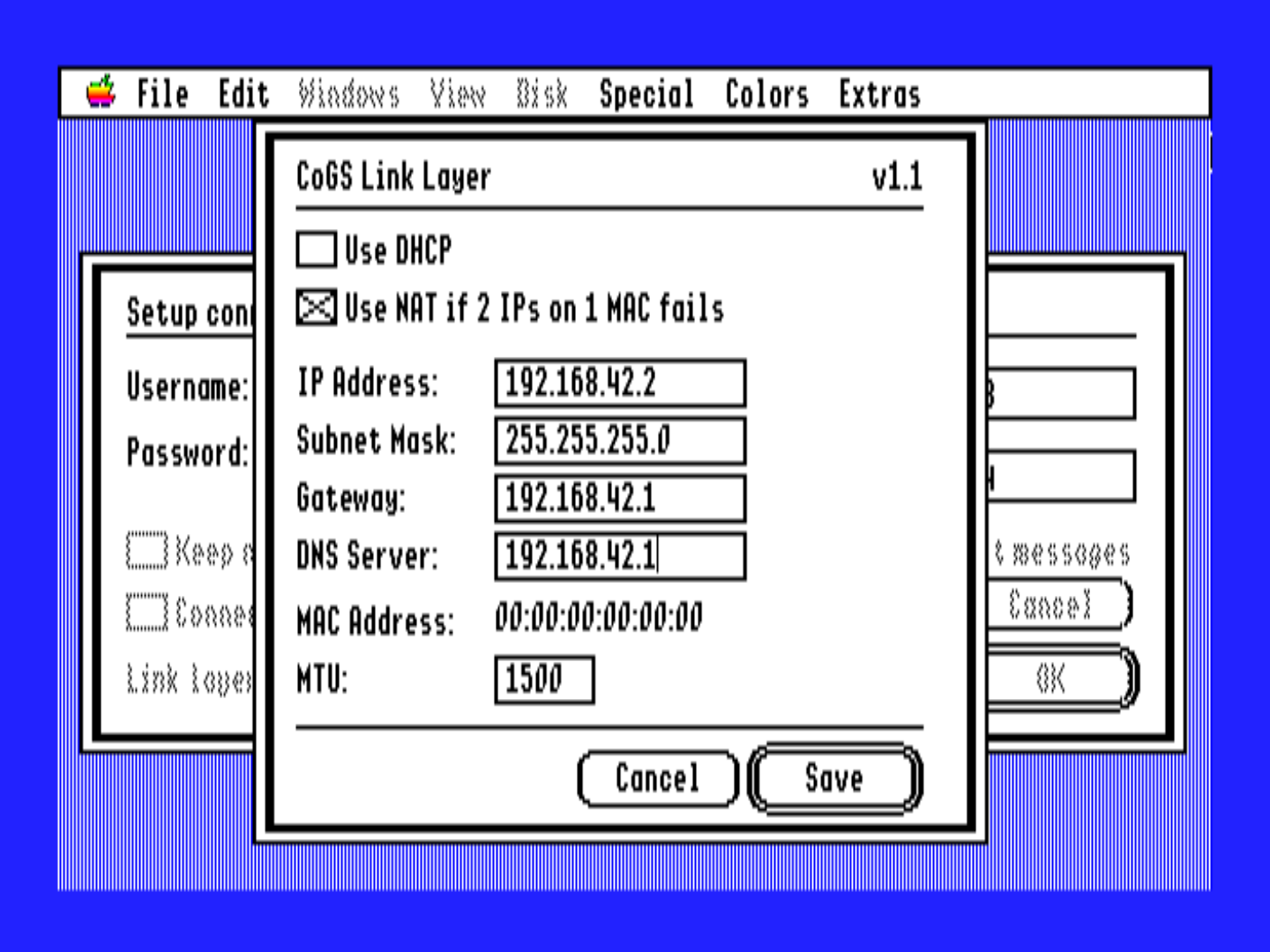
Wi-Fi out of the box, and a wired RJ45 on the same card. Plug and play. In bridge mode your Apple II gets its own IP and is a real host on the LAN. On the IIGS, Marinetti software runs unchanged over the CoGS link layer. On 8-bit machines the IP65 stack runs over the card too, in programs built with the CoGS driver; a binary built for the Uthernet does not see CoGS. Co-processing sits behind both, carrying your Apple into the 21st century.
Bridge verified on real hardware
Audio on the GS
The card-injected CDA is also a player. Browse the a2cogs catalog by shelf, play SoundSmith songs natively through the Ensoniq (Tool219), stream PCM tracks, internet radio, and podcasts through Tool226, built on Petar Puskarich’s Tool225 (used with permission), set EQ, and leave it playing in the background. The card transcodes MP3 to the PCM the GS wants.
240 tracks · 12,000+ stations · 800 podcasts
Pictures on the GS
Press V on a disk and its box art fills the screen. The card streams the raw Super Hi-Res, HGR, or double hi-res bytes and the CDA blits them straight into video memory: no decoder on the host, no files on a disk. 1,016 covers and title screens, browsable by format, with a marked-picture slideshow.
New in firmware 0.181+
Boot off the network
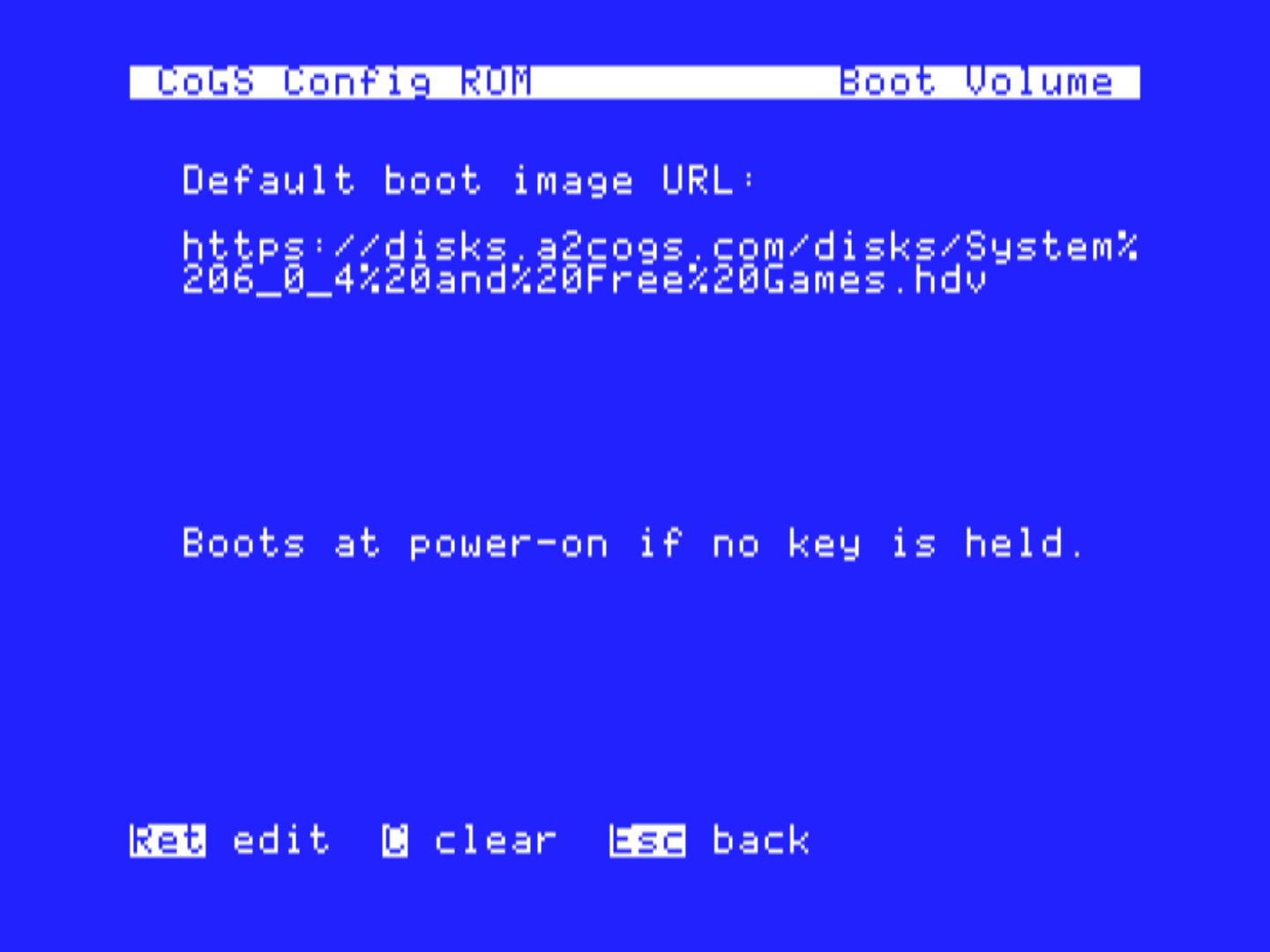
Give the card a link to a disk image — on your own network or anywhere on the internet — and the Apple II sees a real drive: it boots from it, reads it, and writes it back. No driver installed on the host, nothing on a local card. The card speaks SmartPort and ProDOS block right out of ROM.
Streaming on real hardware
A clock
The card runs NTP for secure time anyway, so it can set your machine's clock. For everyone whose No-Slot Clock battery died decades ago.
Time synced
Card vitals
The card reports its own health: on-chip temperature, the slot's +5V rail (a free read on your host power supply), uptime, a unique serial, and why it last booted. It answers even with Wi-Fi down, and shows up live in the desktop control panels.
Working
It updates itself
About / Update checks a2cogs.com right from the machine, lists releases with dates and build notes, and the card downloads, verifies, and flashes the one you pick. No cable, no other computer, ever.
New in firmware 0.73+
slot 3 — CoGS
; host writes a framePING-> caps $7FHTTP api.example -> 200 OK
JSON_GET choices[0]
.message.content
->"Hello, Apple II."
Native to the machine
It feels like part of your Apple. Because it is.
Hardware is only half of it. CoGS is built to disappear into the Apple II you already know — configured from the desktop, and wired into the network stack the community already uses.
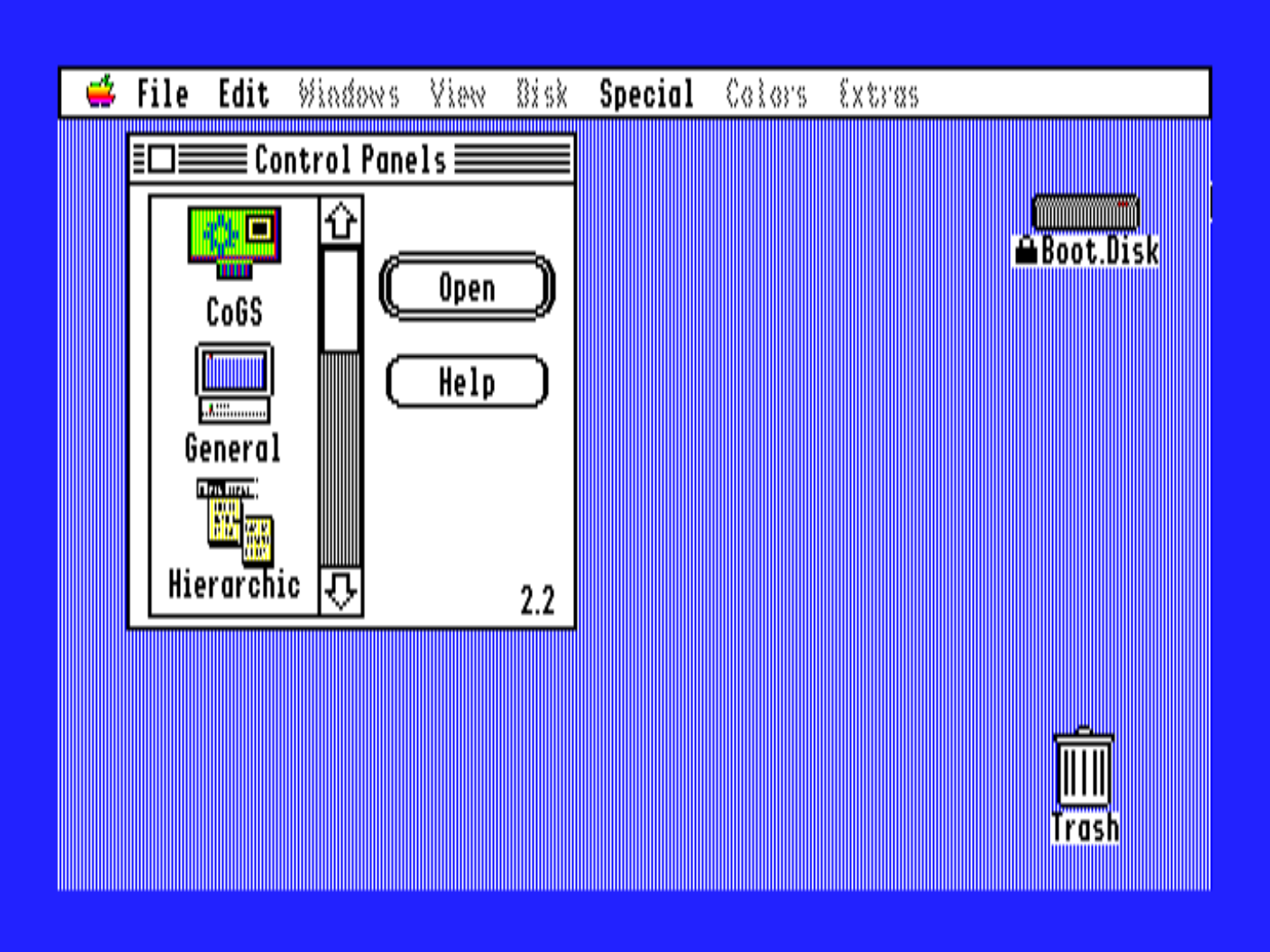
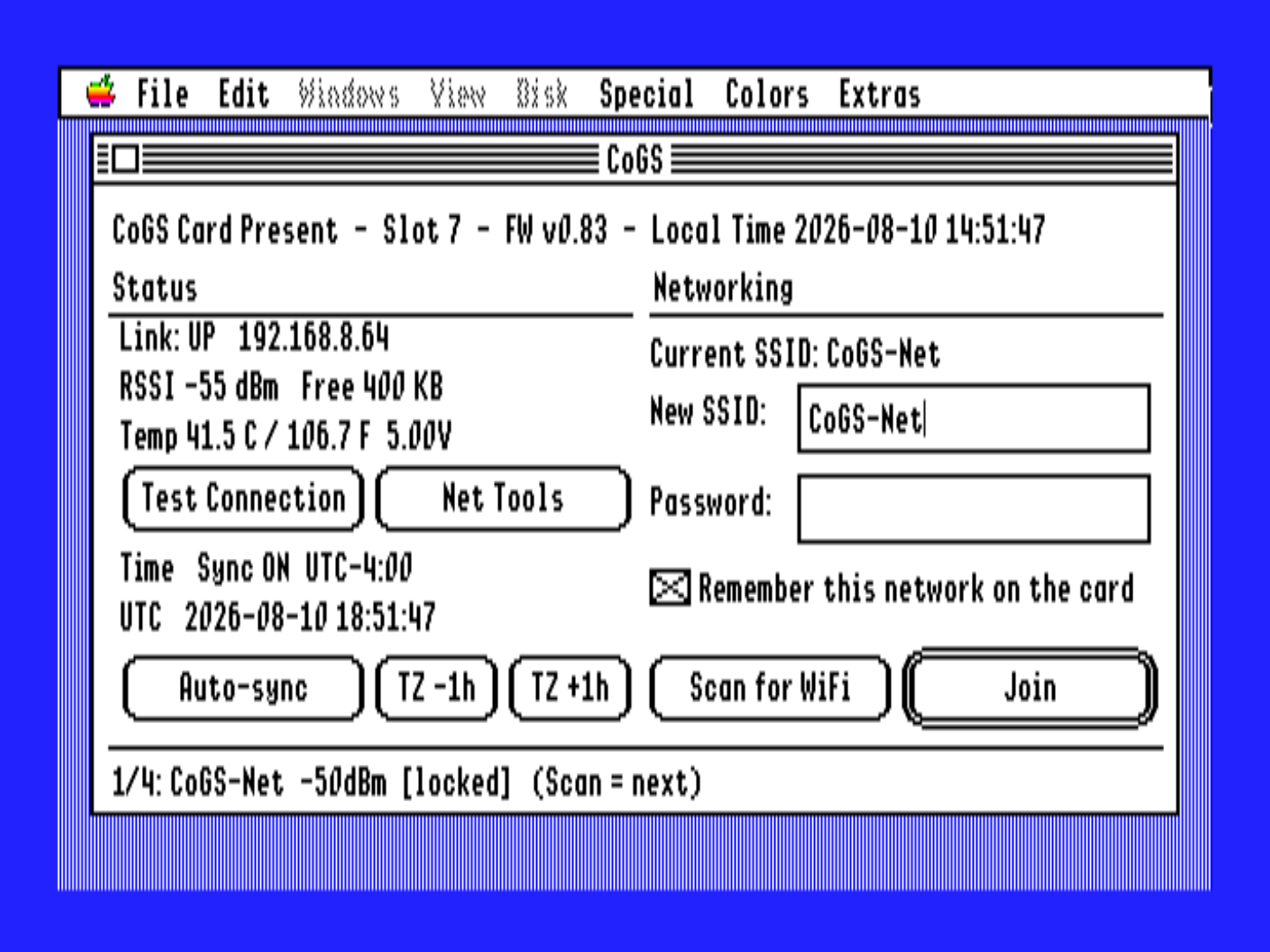
CoGS Control Panel on the GS
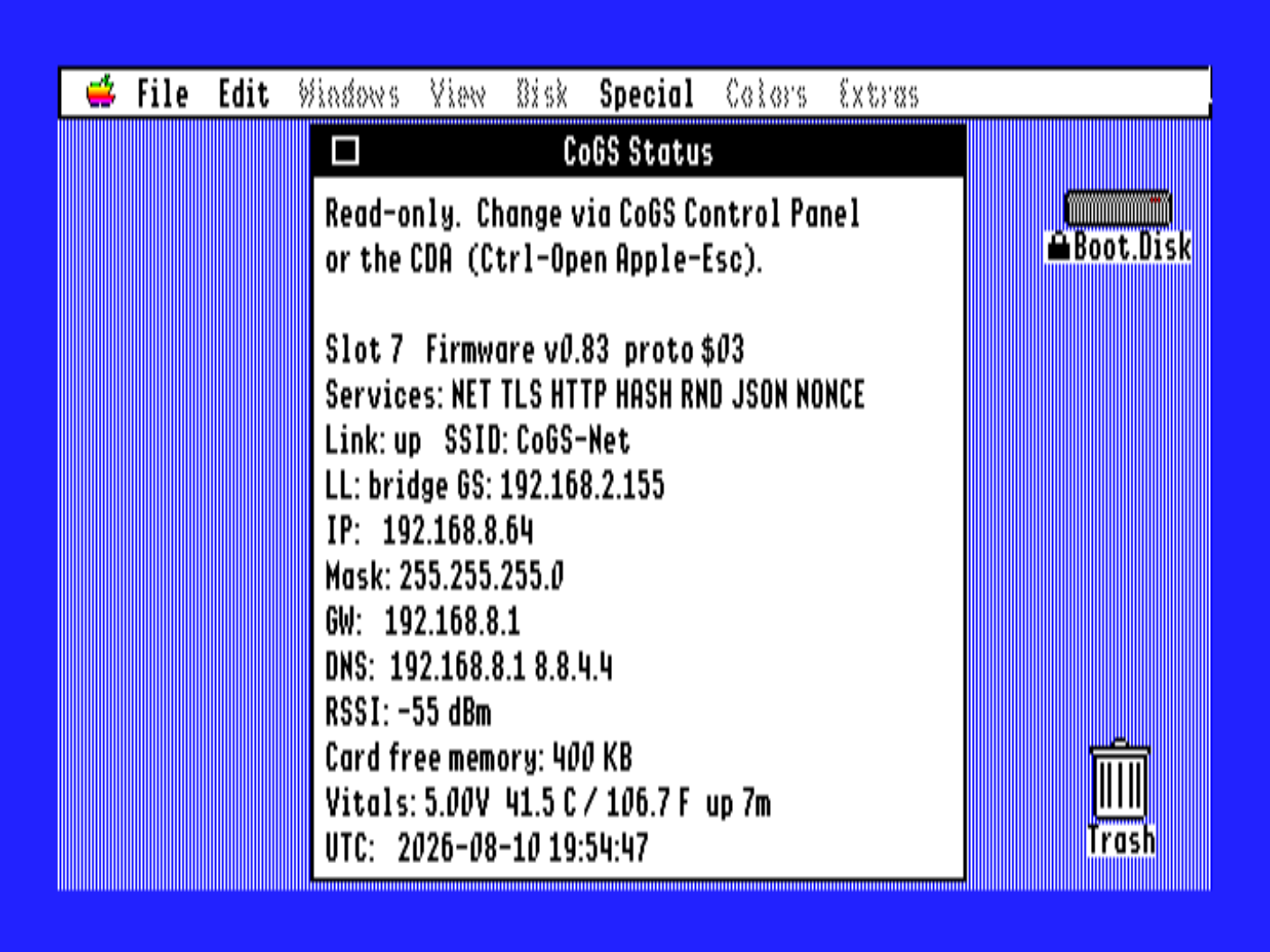
Set up and watch the card right from the machine, no serial cable and no guesswork. One on-card configuration, three faces, so a change in one shows up in the others — in whichever place suits the moment:
Control Panel (CDev) — the first-class config home, right next to TCP/IP and Time. Scan for nearby networks and pick one, join Wi-Fi, run a live connection test, set your time zone and auto-sync the clock, and see your network at a glance (SSID, IP, subnet, gateway, DNS, MAC).
Status (NDA) — a thin live-status window in the Apple menu that floats over any app: link, IP, signal, the full network read-out, and the clock, updating as you watch.
Console (unified ROM/CDA) — the bare-metal rescue tool. At power-on it is the card's boot ROM; on a GS/OS boot the card installs the same console as a Classic Desk Accessory automatically, reachable with Ctrl‑⌘‑Esc even on a half-booted machine. Nothing to install on the disk. Scan and pick a network, bring Wi-Fi up, run the network tools, set the clock, browse and mount network disks, play the a2cogs audio shelves or internet radio, and view the box art.
Working on hardware
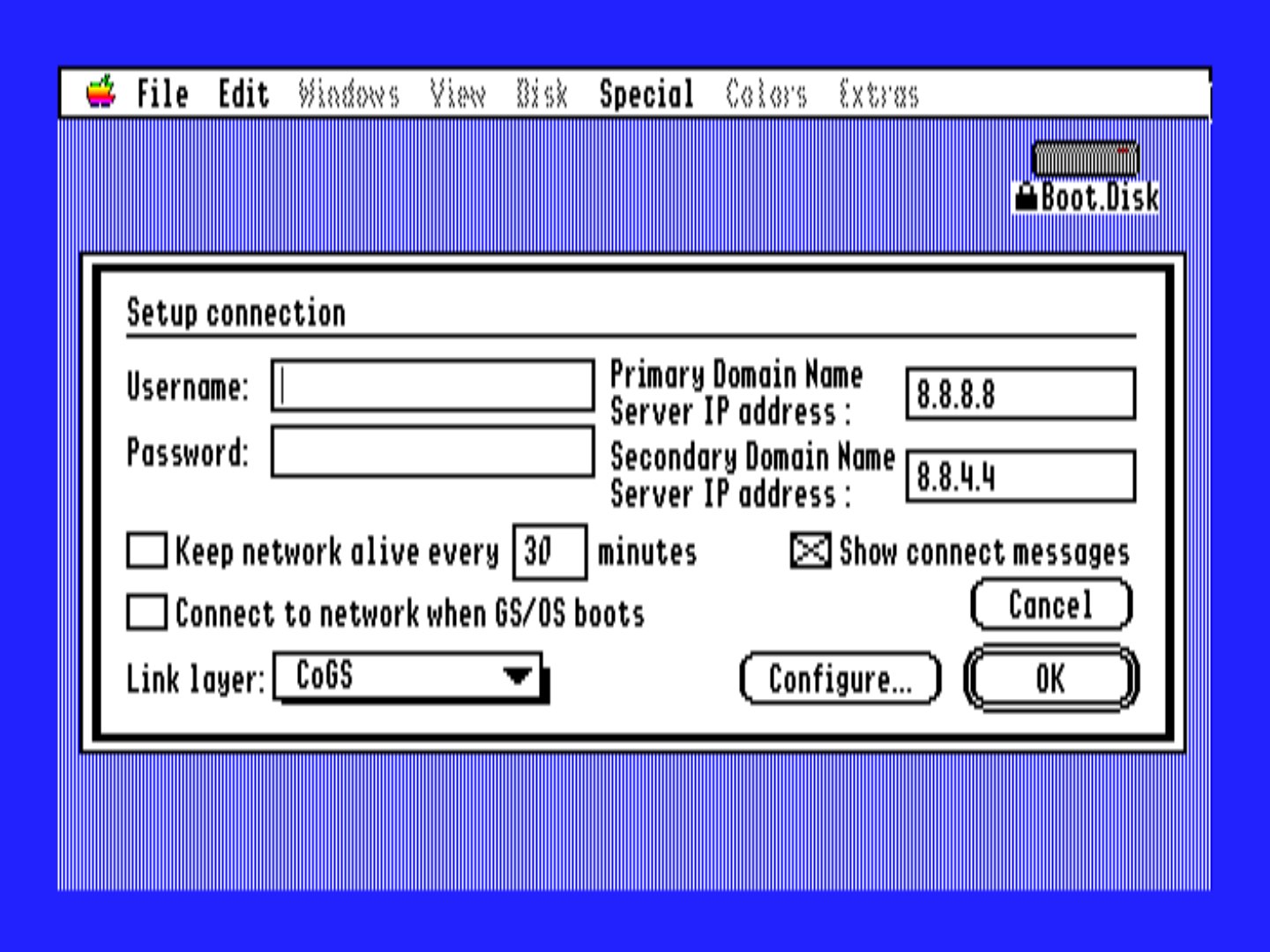
Marinetti GS Link Layer
A native link-layer driver so the whole Marinetti TCP/IP ecosystem runs over CoGS. In bridge mode the GS gets its own IP and is a first-class host on your LAN (you can ping it from your Mac), so existing Marinetti apps — mail, web, IRC — run unchanged. Verified on real hardware, with a NAT mode for networks that need it.
Working
Every Apple II
A slot is a slot. The same card on the same open A2Pico carrier runs in the ][+, the //e, and the IIGS. And the config ROM means the 8-bit machines get the full experience with nothing installed: power on a //e, join Wi-Fi, pick Play a game, and boot any of 527 8-bit games streaming over the network, Total Replay's 519 arcade titles among them, or one of 170 MECC classics (Oregon Trail included) straight off the MECC menu volume, one Return away. The cc65 / ProDOS 8 client covers the co-processor services (DNS, TCP, and a TLS 1.2 HTTPS handshake on the card) for software that wants them.
Working on hardware
Audio on the IIGS
The CDA is also a player.
Open Browse Audio and the card asks what you want to hear: 94 SoundSmith songs off the old BBS and hard-drive shelves, 33 demo-scene tracks (the FTA catalog among them), 43 pop covers, the holiday shelf, and 59 PCM tracks, 240 in all, plus internet radio and podcasts: 12,000 live stations from Radio Browser, by genre, by country, most played, or by name, and 800 podcast shows with their episode lists. SoundSmith plays natively through the Ensoniq with Tool219. PCM, radio, and podcasts stream through the card into Tool226, based on Petar Puskarich’s Tool225 (baked on the card, used with permission); the card transcodes MP3 to the unsigned 8-bit 21973 Hz PCM the chip wants, stereo as planar L/R blocks.
Every list shows the type (DOC or PCM), the length, and S for stereo. Mark tracks for a playlist, shuffle a shelf, set the EQ, and press B to keep playing while you go back to the desktop. Tested on stock ROM 1 and ROM 3 machines and with the TransWarp GS and AppleSqueezer accelerators (a timing issue in PCM playback on AppleSqueezer systems is being worked on). Your own tracks play the same way from a CoGS Image and Audio Manager share on the LAN.
What do you want to hear? Browse Audio, Now Playing, EQ, Internet Radio, Podcasts
Firmware 1.39 · Tool219 SoundSmith + Tool226 PCM · ROM 1 and ROM 3 · TransWarp GS and AppleSqueezer
Pictures on the IIGS
And a picture viewer.
Every disk with a V in Browse Disks has its art one key away: 791 box covers (the What is the Apple IIGS? collection and Total Replay's own) and 225 title screens, 1,016 pictures in all. Browse Pictures sorts the shelf by kind and by format: 864 in 320x200 Super Hi-Res, 144 in HGR, 8 in double hi-res. Mark a few and run a slideshow.
The card serves each picture as the raw bytes the video hardware wants, and the CDA streams them straight into screen memory: no decoder, no disk, no file on the GS. The covers below are decoded from those same bytes, so this is what the monitor shows.
What do you want to see? Browse Pictures, V in Browse Disks
Neuromancer · SHRZany Golf · SHRRastan · SHRKarateka · Total ReplayLode Runner · Total ReplayBruce Lee · Total Replay
A small lobby at lobby.a2cogs.com pairs two players of the same game and relays their moves, so two Apple II owners with a CoGS card can play each other head to head from anywhere. Type a name and it seats you against whoever is waiting, or against a friend if you both enter the same room code. Both machines run the full game from a shared seed and only the moves cross the wire. The card does the HTTPS; nothing is installed on the machine, and there are no accounts.
Doom is on it. Webifi’s Doom for the IIGS gained a Network Game row in its own menu: pick deathmatch or cooperative, a skill and a map, type a name, and the lobby seats you against whoever is waiting. Every tic of both players’ controls crosses the card over one open connection, and both machines run the same game in step. Stream it from Browse Disks as Doom CoGS Deathmatch (needs an accelerated IIGS and firmware 1.36). The second player and the network are open source at github.com/rperissi/iigs-doom.
Esc, Network Game, Find Players. Then it is Doom.
Played between a ROM 01 IIGS with an AppleSqueezer and a ROM 3 with a TransWarp GS, and each against the emulator. Frags and wins go on the lobby leaderboard at lobby.a2cogs.com/top?g=doom.
The first game on it was Ken Franklin’s Milestones 2000, the 1990 Mille Bornes card game for the IIGS, with a second human player added inside Ken’s original Pascal source. Your opponent’s name shows in the game, and rally wins and best scores go on the lobby leaderboard. Stream it from Browse Disks as Milestones 2000 Network Version. Network play needs CoGS firmware 1.34 or later, which arrives over the air like every update.
Game menu, Network Game. Then drive.
The lobby does not know the rules of any game. It is plain HTTPS with flat JSON replies a card reads with one JSON_GET, built so a ProDOS 8 program in 6502 assembly can use it, so card games, board games, word games and turn-based strategy on any Apple II fit. Everything a developer needs to add network play to a game is public at github.com/rperissi/cogs-gameroom: the lobby contract, the card protocol a client needs, a porting guide, the Milestones network layer as the worked example, a Python test opponent, and instructions for AI coding assistants.
Game Room lobby v0.1 · Firmware 1.34 and later, Doom 1.36 · Milestones 2000 Network Version · Doom CoGS Deathmatch · turn-based and real-time tiers
Plug in and go
The network is a disk.
CoGS does not just fetch data — it serves whole disks. Give it a link to a disk image, on your own network or anywhere on the internet, and your Apple sees a real drive: it boots from it, runs from it, and writes back to it, with nothing installed on the machine.
That makes CoGS the first true plug-and-play Apple II experience. Seat the card, power on, and you are browsing and booting a 2,416-title library with no OS, no boot disk, no setup software, and nothing to configure beyond your Wi-Fi password. From power-on to running is literally about one minute: boot, join Wi-Fi, browse, hit Return, and essentially every published Apple II app ever written is yours to run, streaming over Wi-Fi. For the daily workflow, share a folder of images off your Mac and the card mounts it read/write over the LAN. The days of shuffling floppies, burning CF cards, and clunky transfer utilities are over.
Mount and boot, no install
The card answers SmartPort and ProDOS block calls straight out of its ROM, so the drive is there the moment the machine powers on — the trick the community loves from cards like the CFFA, now coming off the network instead of a local chip. That link can point at a folder shared off your own Mac or at a file out on the web: the card does DNS, TCP, and TLS itself, so an https:// URL mounts exactly like a LAN one. You browse and mount images from the desktop, and the host never knows the disk lives on a server.
No driver, no setup disk — recognized at boot like any other slot drive, on the GS and on 8-bit Apples.
Any link, anywhere — a folder shared off your Mac, a file on a web server, or an image in a public archive. If it answers HTTP range requests, the card can mount it, with HTTPS terminated on the card.
Boot off the wire — set a boot image and the machine comes straight up from your LAN or from the internet.
Read and write — blocks are written back to a writable share, not just read, verified end to end. Read/write is available on your LAN with the CoGS Image Manager; the a2cogs index streams read-only.
Several drives at once — a multi-unit mount table you manage from the desktop, so you can change images without rebuilding the machine. R under Featured on Browse Disks is the last twelve disks you mounted or booted (Return boots, 1-8 mounts, 0 unmounts, X / A after you unmount). R on Disk Drives puts one of those on the selected drive.
Streaming on real hardware · boot-tested index
Power on to a config ROM
No OS, no boot disk, no setup software. The card carries its own config ROM: power the machine on and it comes up in a menu where you join Wi-Fi, check the network, browse the disk index, and pick what to boot. Everything in these screens is running from the card's ROM on a machine with empty drive bays.
Tools in ROM, updates over the air
The card looks after itself, and shows its work on the Apple's own screen. Network Tools in the ROM run DNS lookup, ping, traceroute, TCP port checks, a one-key connectivity self-test, and a WAN-to-card speed test, all executed on the card. And About / Update fetches the release list from a2cogs.com so the card can download, verify, and flash new firmware right from the machine. No cable, no other computer, ever.
A library on the wire
The card ships pointed at the index at a2cogs.com: 2,416 titles, boot tested, searchable and mountable right from the machine. Browse Disks opens on a hub, "What do you want to do?": play a game (1,344), music & art (213), educate & learn (447), utilities & work (204), demos, go online, or the whole shelf by machine (1,433 GS titles, 997 8-bit) and A to Z. The GS side is built on the collection curated at What is the Apple IIGS?, credited on every entry. Total Replay streams directly from its own GitHub release, so its 519 8-bit titles ride along as their own rows, always the latest version. The 170 MECC products list the same way, one row each, tagged MC, booting the MECC menu volume they live on. The 980 programs inside the other What is the Apple IIGS? collection volumes (8-bit Games, System 6.0.4 and Free Games, Communications, the education, productivity, audio, hardware and demo disks) are rows too, tagged HD; mounting the one volume mounts every title on it and its menu or the Finder starts the one you picked. An 8-bit Apple sees only what it can run. Don't take our word for it: browse the live index in the card's own interface, right in your browser, same keys and all.
Reading a row
Half the rows are disk images of their own; the other half are programs inside a larger collection image, listed by their real title so search finds them. The marks on the right say which is which and what Return does.
B
Boots. Return makes it the boot disk. No B is a data disk: a digit key mounts it on that drive.
8b
8-bit software. Shown on a IIGS, where both kinds are listed; a //e or II Plus only ever sees rows it can run.
TR
A game inside Total Replay. Return boots Total Replay; pick the game from its menu.
MC
A product on one of the two MECC volumes. Return boots the MECC menu; pick the product.
HD
A program inside another 32 MB collection from What is the Apple IIGS?. With a B (8-bit Games, System 6.0.4 and Free Games, Communications, 8-bit Eduware, 8-bit Creative) Return boots the volume and you start the program from the Finder or its launcher. Without a B (Odds and Ends, Audio and Utilities, the education and game data disks) mount it with a digit and open the folder in the Finder.
Dn
Mounted on drive n right now. One collection image holds many titles, so every row from it shows Dn at once.
V
Box art or a title screen to view (CoGS Config on a IIGS).
GS titles (1,417) need a IIGS. 8-bit titles (896) run on any Apple II, and that is all a //e lists. The 8-bit Games volume is GS-only despite the name: its games are 8-bit, but the volume boots GS/OS. Total Replay is the 8-bit copy of those games. Everything on the catalog is read-only; programs run, saves need a writable copy on your own share. The owner's manual, chapter 5, has the long form.
Your library too: CoGS Image and Audio Manager
Your own disk images, music, and pictures work the same way. Run the CoGS Image and Audio Manager on a Mac (v1.6; Windows and Linux planned), point it at one library folder, subfolders and all, and click Start Sharing. Every CoGS card on the LAN can scan for the share from the Image/Audio Source page and browse it like the a2cogs catalog: bootable tags from real boot-block probing, search, full read/write on disks, Browse Audio for the music, Browse Pictures for the art.
Your folders become categories on the Apple. Mark a folder with the purple ][ chip in the sidebar (every top-level folder starts marked), give it a label if you like, and press Y on any Browse hub: the card lists your share as "Your source" with one numbered row per folder and its count, then All A-Z and Find by name. A folder of GS games, a folder of 8-bit games, a folder for the kids: that is the menu. The Mac side shows the folder tree, a Folder column, a per-row activity light while the card reads or writes, Show in Finder, and a dated Snapshot of any disk image before you let something write to it. Sidebar, Finder-style columns, IIGS and 8-BIT themes, and a headless cogs-share command line for a Mac in a closet. If the Mac picks up a new address, the card notices on the first fetch and S rescans the LAN.
Sharing on the LAN today · Image Manager 1.8, Intel and Apple Silicon, macOS 12+ · folders as categories, writable shares the Finder padlock follows, a files folder for RetroWrite II documents
What it unlocks
So what can my Apple do now?
With a secure link to the modern web and a co-processor on board, the question stops being “can it?” and starts being “what will you build?” A couple of these are ours to finish; the rest are possibilities, most of them yours to write.
Pull files and updates from a web server or GitHub, back up to the cloud, and mount or boot fresh disk images straight off the network — no copying to local storage first.
Available
Listen and look, on the GS
The same CDA plays SoundSmith songs, the PCM shelf, and internet radio through the Ensoniq (Tool219 and Petar Puskarich’s Tool226), and shows 1,016 box covers and title screens. The Mac Image and Audio Manager shares your own disks, music, and pictures from one URL.
TOTP two-factor codes (the card keeps real time), signed requests, and downloads that are certificate-checked on the card.
Whatever you dream up
It is a slot card with an HTTPS pipe and a toolbox. This community has always done the rest. Possibilities are endless.
For developers
Build your own app for the card
CoGS is not a black box. The building blocks are open: a documented protocol that runs over the slot, plus client code so your program can open a connection, fetch over HTTPS, hash data, or pull true randomness in a few calls. Call it an API if you like, but the point is the opposite of a cloud service you rent. The card is right there in the machine, and it is yours.
Your app6502 / 65816 ORCA, Merlin, cc65
slot calls→
CGSTLS · HTTP · JSON hash · RNG · nonce
Wi-Fi + TLS→
The modern webreal HTTPS APIs out on the internet
Protocol spec on GitHub (coming soon)Client library & headers (coming soon)Example apps on GitHub
Develop without the hardware. A virtual CoGS card runs inside the Ample emulator (and MAME), so you can write and test apps with no card on your desk. It links the same firmware core the real card runs, with live networking through your Mac (DNS, TCP, HTTP, JSON) and a LAN bridge so Marinetti and IP65 software reach the real network. One command sets it up, and the same binary then runs on real hardware. TLS and HTTPS happen on the card’s crypto, so in the emulator use plain HTTP or a local TLS proxy.
Designed for CGS
A mark we want to offer for software built to use the card, so apps that light up your Apple II with modern powers are easy to spot. The seed of a full suite of modern Apple II software, written by the community, running on the machine itself.
The constraint
Apple II Forever.
We mean it as an engineering constraint, not a slogan.
CoGS refuses to become the brain. It would be easy, and wrong, to build a card that runs the program on its own fast processor and hands the Apple II a finished picture. That is not an Apple II anymore. That is a modern computer in a beige case.
CoGS is a co-processor. It does only the work the machine genuinely cannot: it terminates TLS, it hashes, it makes true randomness, it walks JSON, it grinds nonces. In every case the Apple II decides what to ask for, runs the program, and owns the screen and the user. The card is a tool on the bench, not a hand on the wheel.
The story
It started with apps, not a card.
It began with building things for these machines: a Bitcoin miner, then a modern LLM chat client for the Apple IIGS. Each one ran into the same wall: the modern internet's cryptography simply can't run on a 1 MHz 6502 or a 2.8 MHz 65816. There are already good answers to that. Some run the real program on another computer and leave the Apple as a terminal. Others, like the excellent FujiNet, put a dedicated device on the disk port that has been terminating TLS for vintage machines for years, with the Apple still running the show. Offloading the hard cryptography is the right idea, and CoGS stands squarely on that prior art. What I wanted was a different shape for it: not a helper beside the machine but a true card inside a slot — bus-native, mapped right into the machine so the program can call it in a few register writes. The Apple still owns the program, the screen, and every decision. The card just does the parts the silicon of 1986 never could.
What made it feasible was modern tooling. Designing the protocol, writing the firmware, and bringing up the clients with AI-assisted development in Cursor turned what would once have been years into an iterative, almost playful loop — sketch an idea in the morning, have it answering on real silicon by the afternoon. That speed is the point: it unlocks the imagination to actually ship working software for a forty-year-old computer.
So much of the hard groundwork was already laid by this community — the bus interface, the TCP/IP stacks, the toolchains — that the next step felt obvious: build one card that drops into any slotted Apple, with a whole suite of capability on board, to empower the next wave of software and keep our favorite computers alive long into the 21st century (and beyond).
Built on shoulders
Built on open hardware. Source available. Community.
Antoine Vignau and Brutal Deluxe, whose PicViewer and IIGS tooling is the reference the picture path was built against. Petar Puskarich, whose Tool225 Ensoniq streamer is the basis of Tool226, used with permission.
Build the firmware
It runs on the CoGS card and on any A2Pico-family board fitted with a Raspberry Pi Pico 2 W. The protocol lives in a written spec that the firmware follows, including the SmartPort/ProDOS block layer for network disks, with docs that walk through how it all works. I'm planning to release the source, spec, and clients on GitHub soon, free for personal use. Commercial use, including selling boards with CoGS installed, is licensed separately; write to [email protected].
Source on GitHubcoming soonSpec & docs on GitHubcoming soonContributing guide on GitHubcoming soon
The CoGS card
Sign up and I'll email you when a shop has cards in stock.
The card is $79 plus shipping at Joe's Computer Museum and MacEffects. If a shop is out of stock, you may be able to place a pre-order or sign up for a notification directly from them.
Drop-in: no OS, no boot disk, no setup software
2,416 disk images, 240 tracks, 12,000+ radio stations, 800 podcasts, 1,016 pictures, all served from a2cogs.com
Firmware updates itself over the air from the machine
Works in the ][+, the //e, and the IIGS
How can I get one?
Available now from two authorized resellers.
$79 plus shipping. Wi-Fi and wired Ethernet on one board. The card arrives flashed; later versions come from About / Update in the CoGS menu.
Latest firmware v1.39streaming network disks, eight drives live in the Finder, swap them from CoGS Config without a Finder dialog, recent disks under Featured and on Disk Drives R · 2,416 disk titles by category · SoundSmith + PCM audio, internet radio, and podcasts · two-player Doom and Milestones through the Game Room · box art and title screens (SHR, HGR, DHGR) · CoGS Image Manager shares with your own folders as categories · Marinetti bridge on Wi-Fi or the wire (link layer 1.4) · Wi-Fi and wired Ethernet · Support Snapshot under About · over-the-air updates